

Subscribe Calendars for organizers
Your events in your visitors' calendars
For clubs, course providers, schools and WordPress sites: one button on your website, and visitors subscribe to your events in Apple Calendar, Google Calendar, Microsoft 365 or Outlook. When you move an event, their calendar catches up on its next fetch. No trackers, hosted in Germany.
How it works
Enter once, current everywhere
Add your events
Create a calendar and write events into it: through the Publisher API, a plugin that uses it, or your AI agent. Every event carries your own ID, for example the WordPress post ID.
Embed the button
Two lines of HTML on your website and you are done. We host the calendar feed, a subscribe page with your logo, and the button itself.
Visitors subscribe
One click, pick an app: Apple Calendar, Google Calendar, Microsoft 365, Outlook.com or desktop Outlook. Changes reach subscribers the next time their calendar app fetches the feed.
Live preview
Style your button, copy the snippet
This is the real button with a demo calendar. Change color, text and language here; the snippet next to it follows along.
Preview on your website
Our classes and events
Subscribe to our calendar and every event shows up in your calendar app automatically.
Loading preview …
Clicks fire the ks:subscribe event. Try it:
No click yet.
<div class="ks-subscribe" data-calendar="cal_XXXXXXXXXXXX" data-lang="en" data-color="#003DC5"></div>
<script src="https://app.kalender-sync.de/embed/v1/button.js" async></script>
Replace cal_XXXXXXXXXXXX with your calendar's ID. You find it in the app and in the API response.
The preview uses a real demo calendar. Picking an app in the menu creates a real subscription to that demo calendar.
Let your agent set it up
Your AI assistant creates the calendar, adds the events and hands you the finished button code.
How it works with AI agentsWhat's included
Button, subscribe page and feed in one place
Embeddable button
Set color, text and language with attributes; the text color adjusts automatically. The button renders in a shadow DOM, so your site's CSS cannot break it.
Subscribe page
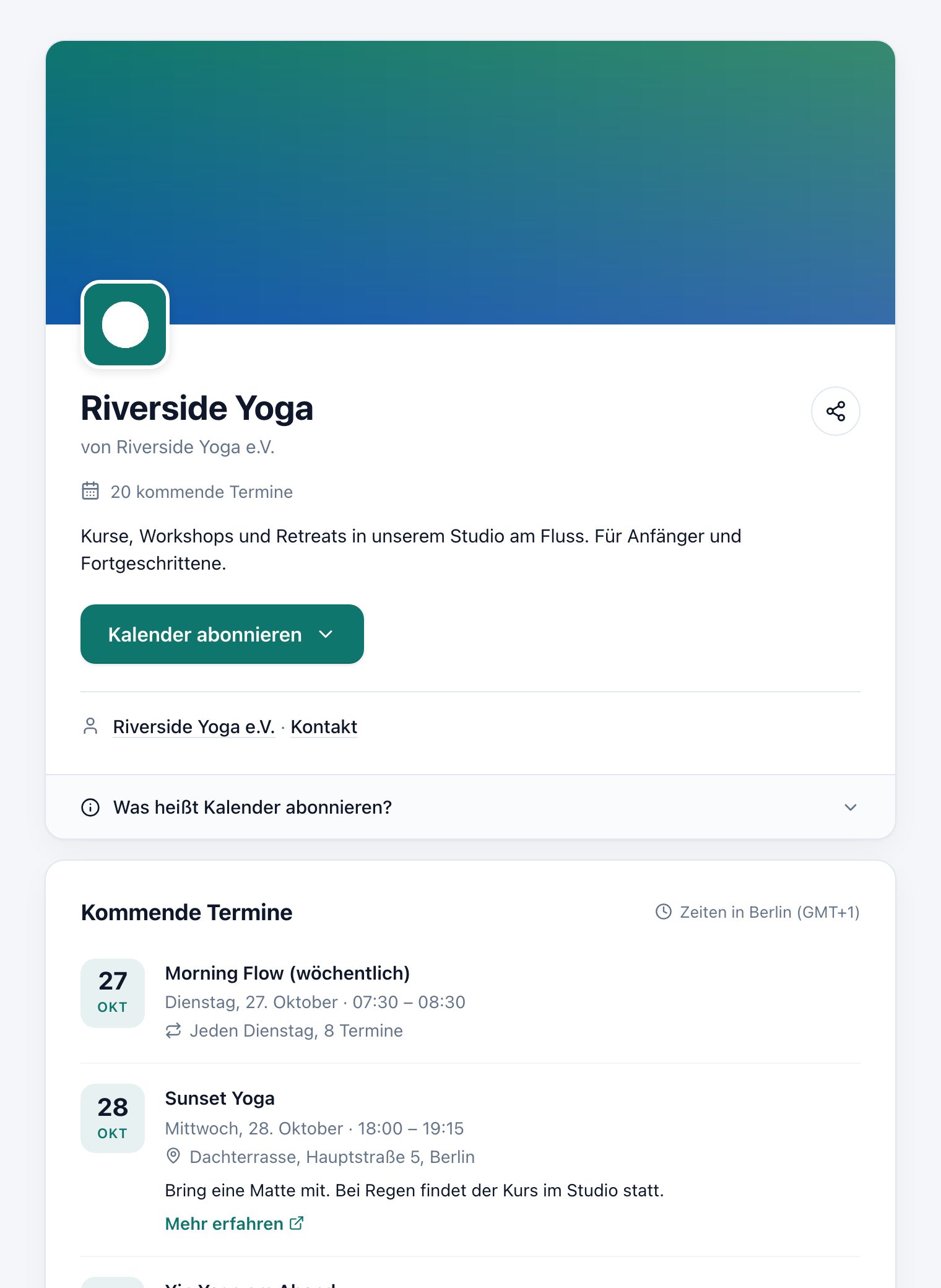
One page per calendar with banner, logo, organizer and upcoming events. Share it by link, QR code or the phone's share menu. You decide whether events are listed publicly.
ICS feed
A standard iCalendar feed any calendar app can read. For apps not in the menu, “Other app” leads to the subscribe page with the feed link.
Recurring events
Weekly classes, monthly meetups, exceptions and moved single dates. The API accepts recurrence rules (RRULE) as defined in RFC 5545.
Stats without tracking
Active subscribers per calendar app and button clicks over the last 30 days. Counted from feed fetches, not from people.
Built for plugins and platforms
Batches of up to 100 events and a full sync that removes whatever no longer exists. A plugin keeps the calendar current without its own bookkeeping.
Privacy
Button and subscribe page: no trackers, no cookies
Your visitors subscribe to a calendar, nothing more. The button loads only its own script from app.kalender-sync.de and nothing else. The menu items are plain links that create the subscription and hand over to the chosen app.
Hosting, encryption and DPA in detail →No trackers, no cookies
The button and the subscribe page set no cookies and load no third-party services. That is why the subscribe page shows no cookie banner.
We don't store who subscribes
No IP address, no user agent. The “you already subscribed” notice lives only in the visitor's browser (localStorage).
Hosted in Germany
Servers at Hetzner in Nuremberg. Event content is stored encrypted in the database. A GDPR data processing agreement (Art. 28) is included on every plan.
Your analytics, your consent
Every click fires the ks:subscribe event on your page. If you want to measure clicks, do it with your own tool and under your own consent.
Plans
Test for free, go live from Basic
Subscribe Calendars are part of the regular Kalender Sync plans. No separate contract needed.
| Plan | Live calendars | Active subscribers |
|---|---|---|
| Free 3 test calendars with 500 events each, ks_test_ keys | sandbox only | not live |
| Basic | 1 | 500 |
| Professional | 10 | 5,000 |
| More | on request | on request |
- Up to 5,000 events per live calendar.
- Active means the calendar app fetched the feed in the last 14 days.
- If you reach a limit, everything keeps running. You get an email and a notice in your stats.
For AI agents
Set it up yourself or let your agent do it
Your assistant creates the calendar, adds the events and hands you the button. Or you write the events yourself with the Publisher API.
Paste this task into your assistant. It reads the guide and walks you through it step by step:
Read https://kalender-sync.de/en/agents.md and set up a subscribe calendar with Kalender Sync with me. Walk me through sign-in, the calendar, the events and the button for my website step by step.
You do the sign-in yourself. Claude and ChatGPT create calendars and events directly once you tick “Manage subscribe calendars” when connecting. Already connected? Reconnect once and tick the box. The tools cost no credits. Coding agents like Cursor use the Publisher API and embed the button in your website.
- 1 Create a free account and a sandbox key under Settings › Developer / API. Set it as environment variable KS_KEY. Live keys come with Basic.
- 2 Create a calendar and add events, each under your own ID: Terminal
curl https://api.kalender-sync.de/v1/publisher/calendars \ -H "Authorization: Bearer $KS_KEY" \ -H "Content-Type: application/json" \ -d '{ "name": "Studio classes", "timezone": "Europe/Berlin", "language": "en" }' # take the id from the response export KS_CAL="cal_XXXXXXXXXXXX" curl -X PUT https://api.kalender-sync.de/v1/publisher/calendars/$KS_CAL/events/kurs-101 \ -H "Authorization: Bearer $KS_KEY" \ -H "Content-Type: application/json" \ -d '{ "title": "Yoga for beginners", "start": "2026-11-03T18:00:00", "end": "2026-11-03T19:15:00" }' - 3 Paste the button into your page, in WordPress for example as an HTML block. Set color and text in the live preview above. HTML
<div class="ks-subscribe" data-calendar="cal_XXXXXXXXXXXX"></div>
<script src="https://app.kalender-sync.de/embed/v1/button.js" async></script>
- 1 Create a free account and a sandbox key under Settings › Developer / API. Set it as environment variable KS_KEY. Live keys come with Basic.
- 2 Create a calendar and add events, each under your own ID: publish.py
import os, requests api = "https://api.kalender-sync.de/v1/publisher" headers = {"Authorization": f"Bearer {os.environ['KS_KEY']}"} cal = requests.post(f"{api}/calendars", headers=headers, json={ "name": "Studio classes", "timezone": "Europe/Berlin", "language": "en", }).json() requests.put(f"{api}/calendars/{cal['id']}/events/kurs-101", headers=headers, json={ "title": "Yoga for beginners", "start": "2026-11-03T18:00:00", "end": "2026-11-03T19:15:00", }).raise_for_status() print(cal["subscribe_page_url"]) - 3 Paste the button into your page, in WordPress for example as an HTML block. Set color and text in the live preview above. HTML
<div class="ks-subscribe" data-calendar="cal_XXXXXXXXXXXX"></div>
<script src="https://app.kalender-sync.de/embed/v1/button.js" async></script>
- 1 Create a free account and a sandbox key under Settings › Developer / API. Set it as environment variable KS_KEY. Live keys come with Basic.
- 2 Create a calendar and add events, each under your own ID: publish.mjs (Node 18+)
const api = "https://api.kalender-sync.de/v1/publisher"; const headers = { Authorization: `Bearer ${process.env.KS_KEY}`, "Content-Type": "application/json" }; const cal = await fetch(`${api}/calendars`, { method: "POST", headers, body: JSON.stringify({ name: "Studio classes", timezone: "Europe/Berlin", language: "en" }), }).then((r) => r.json()); await fetch(`${api}/calendars/${cal.id}/events/kurs-101`, { method: "PUT", headers, body: JSON.stringify({ title: "Yoga for beginners", start: "2026-11-03T18:00:00", end: "2026-11-03T19:15:00" }), }); console.log(cal.subscribe_page_url); - 3 Paste the button into your page, in WordPress for example as an HTML block. Set color and text in the live preview above. HTML
<div class="ks-subscribe" data-calendar="cal_XXXXXXXXXXXX"></div>
<script src="https://app.kalender-sync.de/embed/v1/button.js" async></script>
FAQ
Questions about Subscribe Calendars
How fast do changes reach subscribers?
As soon as you change an event, it is in the feed. Subscribers see the change when their calendar app next fetches the feed. The app decides how often that happens: Google Calendar often takes several hours, Apple and Outlook vary by device and setting.
Pushing changes directly into connected calendars is planned and will come later as a separate update.
Subscribe Calendars in the docsWhich calendar apps work?
The button's menu offers Apple Calendar (iPhone, iPad, Mac), Google Calendar, Microsoft 365, Outlook.com and the Outlook desktop app. The app that matches the device is listed first.
For any other app there is “Other app”: it leads to the subscribe page with the feed link, which every calendar app with a subscribe feature understands.
What do subscribers see in their calendar?
The events with title, time, location, description and link, exactly as you enter them. The calendar shows up as its own read-only calendar next to their others.
Subscribers don't see each other, and you don't see who subscribed. You only see counts per app.
How do people unsubscribe?
In their own calendar app: remove the subscribed calendar or delete the subscription. Subscribers need no Kalender Sync account for that, nor for subscribing.
Do I need to know how to code?
Not for the button: you paste two lines of HTML into your page, for example into a WordPress HTML block. To maintain the events you use the Publisher API, a plugin that supports it, or let your AI agent do it.
Publisher APIWhat does a subscribe calendar cost?
On the Free plan you test everything in the sandbox. You can go live from Basic with one calendar and up to 500 active subscribers; Professional allows ten calendars and up to 5,000 active subscribers. Above that, we'll make you an offer.
Active means the calendar app fetched the feed in the last 14 days. If you reach a limit, everything keeps running and you get notified.
See pricingDoes Google index the subscribe pages?
Not at the moment. Subscribe pages are set to noindex and don't appear in search engines. People find your events through your own website, where the button lives.
Does the button work with page builders?
Yes. On load, the script looks for every element with the class ks-subscribe. If your page builder or app inserts content later, call window.KalenderSync.mountButtons() afterwards.
More in the docs: Subscribe Calendars · Publisher API
Bring your events into every calendar.
Start free in the sandboxCurrently supported providers
GoogleMicrosoftApple iCloudKSuiteGMXWEB.DEmailbox.orgiCal-Feeds
